STEP 7
Your teacher’s guide
What to teach and how to get it across — with an explanation you can read out word for word.
How it works →
New for supply staff · Free with People Group Services
No cover work left? Prep Room plans the lesson from the syllabus, makes the slides, quiz and handouts, helps when the room gets tricky — and gets your timesheet signed before you leave.
Free for every teacher, teaching assistant and cover supervisor working with People Group Services.
Sound familiar?
Twenty-eight Year 8s, sixty minutes, and the only cover work is a note that says “Photosynthesis — see you Monday”. You’re a supply teacher, so you make it work. But it shouldn’t take the whole of break to get there.
Prep Room for Supply Teachers is the lesson planner, classroom assistant and timesheet we’ve built for the people who teach through People Group Services. It works on your phone, a laptop or the classroom board, and it follows the national curriculum and the GCSE specifications.
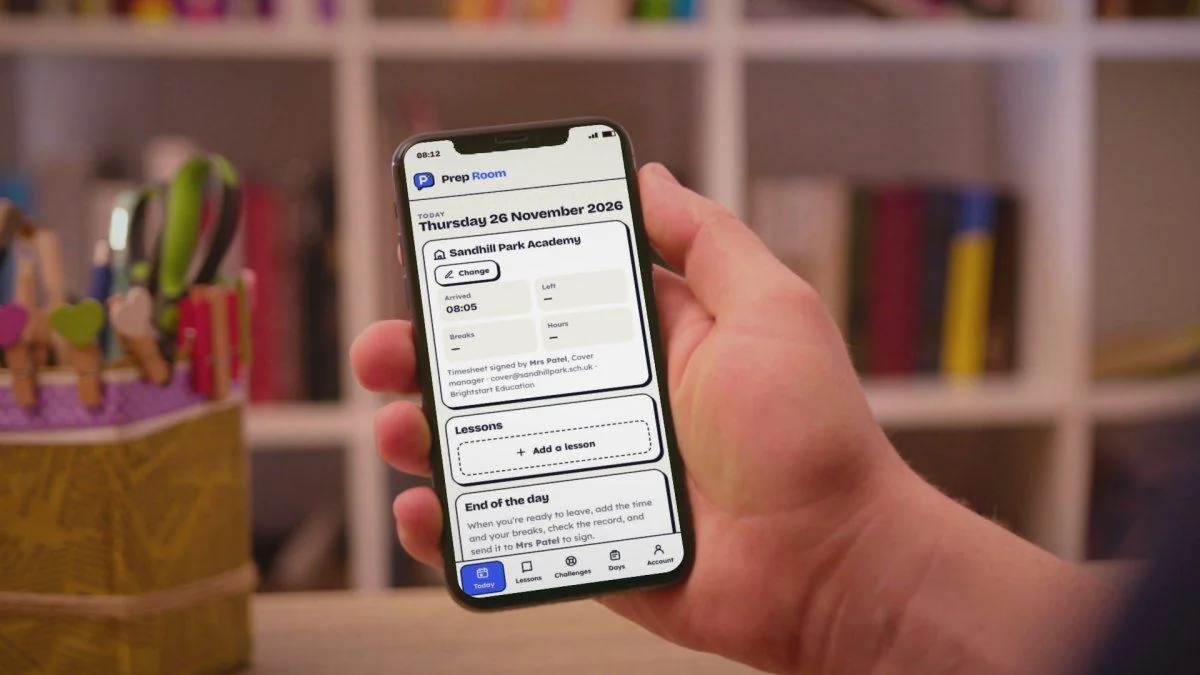
In a couple of minutes
Pick the year and subject, find where the class is up to, and Prep Room’s AI teacher writes the lot from the syllabus. You check it, and it’s yours.
See it in action
Tap a screenshot to see it bigger, or follow a whole day from sign-in to signed timesheet.
What to teach and how to get it across — with an explanation you can read out word for word.
How it works →Present them, download a PowerPoint, or send them to the board from your phone.
How it works →Easy to harder, with the mistakes pupils really make as the wrong answers.
How it works →Six kinds of A4 sheet, with the answers printed separately just for you.
How it works →Calm, practical advice for that class — what to do right now, and the words to use.
How it works →The school signs from a button in their email. No account needed.
How it works →Prep Room for Supply Teachers is free for every supply teacher, teaching assistant and cover supervisor working with People Group Services. There’s nothing to buy and nothing to install — it runs in the web browser on your phone, tablet or laptop.
Your PGS code is personal to you, and two-step sign-in protects your account. Lessons never need pupils’ names. The classroom board only shows what you send it from your phone, so you’re never left signed in on a school computer. And the school signs your timesheet from a link in their email — no account needed.
How it works
Prep Room for Supply Teachers is the lesson planner, classroom assistant and timesheet we’ve built for the people who teach through People Group Services. It works on your phone, a laptop or the classroom board, and it follows the national curriculum and the GCSE specifications. Here’s a whole day with it, step by step.
We email you a personal PGS code. Sign in with your email address and that code — it works for as long as you work with People Group Services. The first time, you add two-step sign-in with the authenticator app on your phone, so your timesheets and records stay safe.
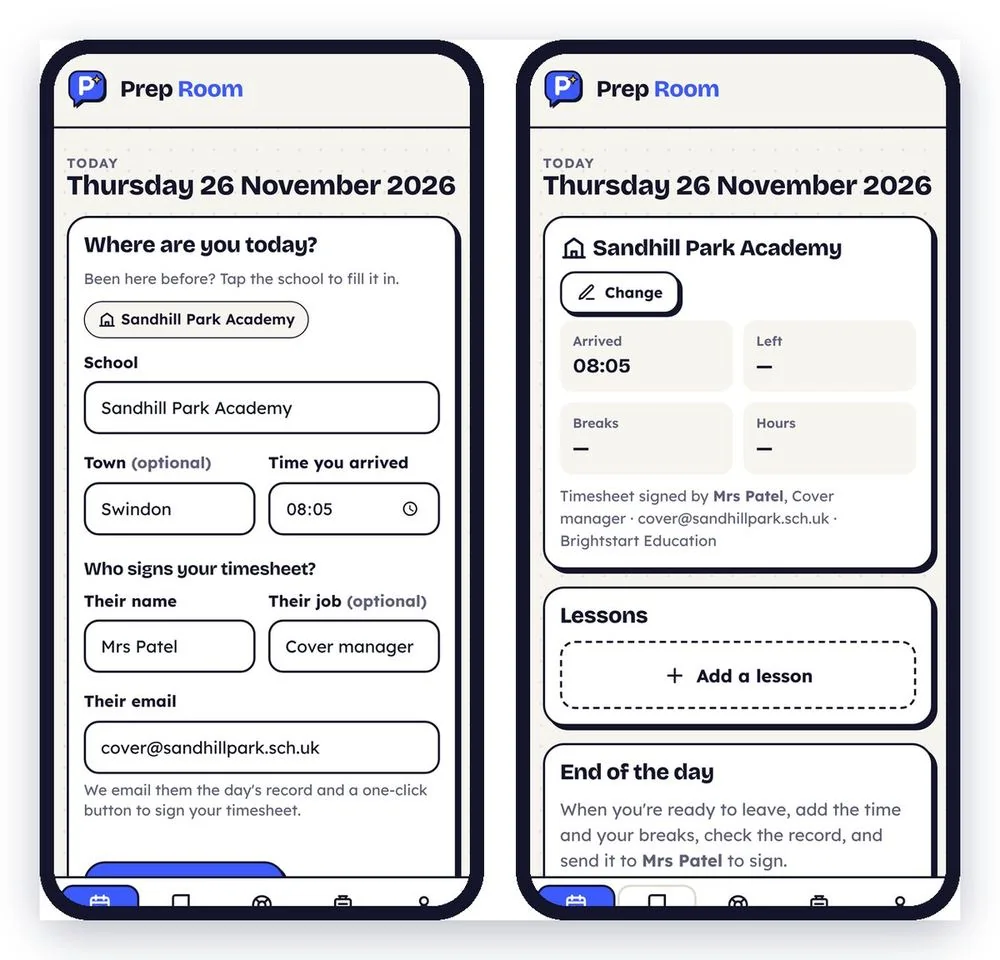
The school, the time you arrived, and who signs your timesheet — their name, job and email. Been there before? Tap the school and it fills itself in.
Pick the year group — Reception to Year 11 — and the subject. Years 5 to 11 get the full teacher’s guide; Reception to Year 4 get simple, general plans built on what the national curriculum says must be covered.
Prep Room gives you the question to ask. Type what they say and it finds the matching topic — or pick it straight from the syllabus: the National Curriculum at Key Stage 3, and the GCSE specifications for Years 10 and 11.
Period, start and finish times, the class, and how long it is — from 30 minutes up to a 120-minute double, which is planned in two halves with a short break. Add the exam board if you know it, and a line about the class (no names, ever).
Every point pupils must be taught for that topic, with one tap to mark what the class already knows, what needs a quick recap, and what needs teaching properly.
The big idea, the key skills, how to get it across step by step, an explanation you can read out word for word, the subject knowledge you need, key vocabulary, common misconceptions and quick questions to check they’ve got it — with tips for teaching assistants and cover supervisors too. Prep Room’s AI teacher writes it from the syllabus; you check it, and it’s yours.
Not sure where they’re up to? Run a short quiz on the board, tap how many got each question, and Prep Room marks the syllabus for you — then rewrites the plan, slides, quiz and activities to teach what’s left.
Objectives, success criteria, key vocabulary and what to set up in five minutes — then the lesson minute by minute: do now, explanation with a worked example, guided and independent practice, checks for understanding, plenary and exit ticket. Support and stretch, including SEND and EAL, is built in.
Seven to ten slides that never run off the bottom, with pictures from Wikimedia Commons and YouTube clips that play on the slide. Present them, download them as a PowerPoint file, or send them to the classroom board straight from your phone — nobody signs in on the school computer.
From easy to harder, with the mistakes pupils really make as the wrong answers. Run it in class and reveal each answer with the reason, or print it with a separate answer sheet.
Five low-preparation ideas you can run with a board, paper and mini whiteboards: a quick-fire round, think–pair–share, a sorting task, a game and a short written task.
Six kinds of sheet — read and answer, questions to work through, work your way through, read this, understand it, and a group workshop. Each prints neatly on A4 with lines and boxes to write in, and the answers print separately, just for you.
Trusted free links — Oak National Academy, BBC Bitesize, BBC Teach and more — and big-screen tools for the board: a timer, pick someone, make groups, key word cards and think–pair–share.
Say what’s happening, the way you’d tell a colleague — “two pupils keep talking over me” — and get the guide’s answer straight away, then calm, practical advice for that class: what to do right now, the words to use, and what to do if it carries on. 93 topics and 518 real classroom situations, plus a think tank of what other supply teachers tried.
Tap quick notes or dictate what happened — work collected in, behaviour, who needs following up (initials only) — and mark the lesson as taught.
Add the time you left and your breaks, check the record and send it. The school gets an email with a button to sign your timesheet — no account needed — and you can see the moment it’s signed.
Testers wanted
We’re looking for testers over the next few weeks, and we’re planning to launch over the Christmas break. Register your interest and we’ll be in touch.
Testing, the launch, how it works, or seeing it in action.
hello@peoplegroupservices.comPrep Room comes free with People Group Services. Choose “Find out about joining” on the form and we’ll explain how it works.
How joining worksWe’ve emailed to confirm. We’re looking for testers over the next few weeks and planning to launch over the Christmas break — we’ll be in touch.
If you have a PGS number, reply to that email with it so we can match you to your record.
Can’t see the email? Check your junk folder, or email hello@peoplegroupservices.com.
Not with People Group Services yet?
Prep Room for Supply Teachers comes free with People Group Services. Tell us a little about you and we’ll explain how joining works — or, if you already work with us, how to be one of our first testers.